How To Get Started With Chaos Testing Using mirrord
mirrord runs a process on your machine, but connected to all of its dependencies in a staging cluster your team shares. mirrord chaos injects a failure into one (or more) of those dependencies, isolated to your session only. You name a destination and what should go wrong when your service calls it, and the fault applies only to the process running under that session, whether that is on your laptop, a CI runner, or an agent’s sandbox. Anyone else working against the same cluster is unaffected, so there is nobody to coordinate with and nothing to put back.
This walkthrough demonstrates that using a small loan application app, loan-demo-app, with a bug planted in one of its two outgoing calls. By the end the bug is fixed, and you’re able to verify that with the fault still applied. Introducing mirrord Chaos Testing covers the feature in full.
The App, and the Difference Between Its Two Outgoing Calls
The app is three services, with datastores behind two of them:
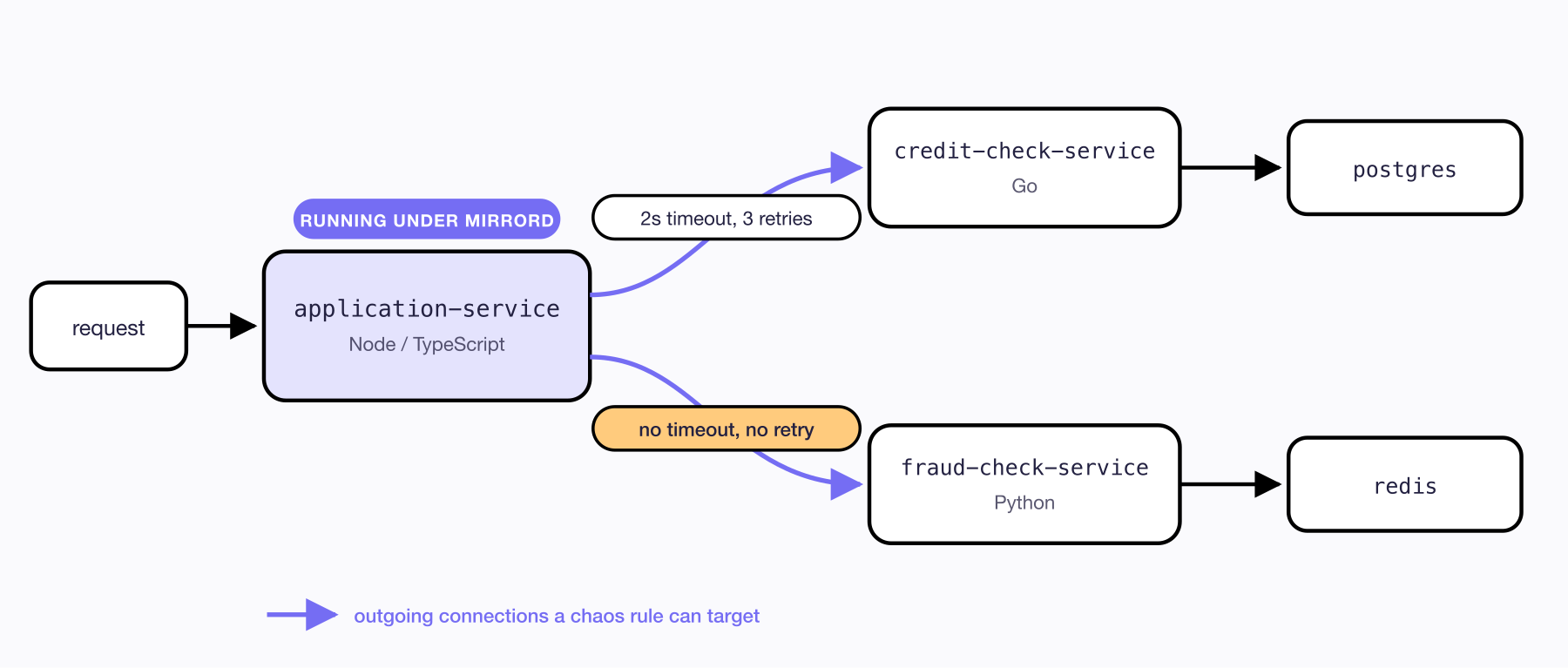
loan-demo-app: application-service calling credit-check-service and fraud-check-service
application-service serves a form, takes an ID number and a requested amount, calls both downstream services, and combines the answers into an approve or deny decision.
The two calls differ by a timeout and a retry loop. getCreditScore bounds each attempt at two seconds and retries three times with exponential backoff:
for (let attempt = 1; attempt <= MAX_ATTEMPTS; attempt++) {
  try {
    const res = await fetch(`${CREDIT_SERVICE_URL}/credit/${idNumber}`, {
      signal: AbortSignal.timeout(TIMEOUT_MS),
    });
    return (await res.json()) as CreditScore;
  } catch (err) {
    if (attempt < MAX_ATTEMPTS) await sleep(BASE_BACKOFF_MS * 2 ** (attempt - 1));
  }
}
getFraudRisk is a plain fetch:
const res = await fetch(`${FRAUD_SERVICE_URL}/fraud/${idNumber}`);
It has no timeout and no retry. That should not get through review, but in a codebase with a few hundred outgoing calls in it, some of them look like this. The difference between the two only shows up once the dependency misbehaves, which is the thing a chaos rule lets you arrange on demand.
Running One Service Against the Cluster
If you want to follow along, the manifests are in the repo, so you can deploy the app with kubectl apply -k k8s/. Make sure you have mirrord 3.250.0 or newer installed (this walkthrough can run using mirrord OSS). Then run application-service on your machine:
cd application-service
npm install
mirrord exec -f mirrord.json -- npm run dev
The config it ships with steals a filtered slice of that service’s incoming traffic:
"incoming": {
  "mode": "steal",
  "http_filter": {
    "header_filter": "baggage:\\s*[^\\n]*\\bmirrord-session={{key}}\\b"
  }
}
{{key}} is the session key, which the app’s config sets from your username with "key": "{{ get_env(name='USER', default='changeme') }}". Requests carrying baggage: mirrord-session=<you> are routed to the process on your machine, and everything else stays with the deployed pod. In your own configs, set key through the config file, MIRRORD_KEY, or mirrord exec --key. Set none of them and mirrord generates one, which mirrord session list prints in its Key column. Either way, the value your requests carry has to be the one the filter was templated from.
Every chaos command needs the session ID. mirrord exec prints it on startup, and mirrord session list will show it at any point after that:
mirrord session list
export SESSION_ID='<session id>'
In a new terminal, port-forward to the service so you can reach it from your machine, then (in another terminal) send it a request. -w prints how long the request took, which is what every timing below refers to:
kubectl -n loan-demo port-forward svc/application-service 3001:3000
Note: in real life, you’d probably have ingress access to your staging cluster and won’t need
port-forward.
curl -s -w '\n%{time_total}s\n' -X POST localhost:3001/apply \
  -H 'Content-Type: application/json' \
  -H "baggage: mirrord-session=$USER" \
  -d '{"id_number":"1001","amount":10000}'
{"decision":"approved","credit_score":720,"fraud_risk":"low","max_approved_amount":15000}
The request was routed to the process you started rather than the deployed pod, and it came back in 9ms. Every request below is the same one.
A Dependency That Slows Down, But Not Past the Timeout
The first rule slows down credit-check-service, the dependency with the timeout on it:
{
  "name": "credit-check-service latency under the client timeout",
  "selector": {
    "upstream": "credit-check-service.loan-demo.svc.cluster.local:8080",
    "percentage": 100
  },
  "effect": {
    "latency": {
      "read_ms": 1200
    }
  }
}
mirrord chaos add -s $SESSION_ID -f ../chaos-rules/01-credit-check-resilient.json
Send the request again and it still approves, at 1.21s instead of 9ms, which is the injected 1200ms on top of what the request already cost. That is still under the client’s two second timeout, so the attempt completes and the decision is unchanged. This is what a dependency degrading inside your tolerances looks like from the outside: slower, and otherwise fine.
Now take the same dependency away completely, using a connection reset instead. Clear the latency rule as you go, so only one rule ever matches this upstream:
{
  "name": "credit-check-service total outage",
  "selector": {
    "upstream": "credit-check-service.loan-demo.svc.cluster.local:8080",
    "percentage": 100
  },
  "effect": {
    "connection_error": {
      "type": "reset",
      "after_ms": 0
    }
  }
}
mirrord chaos delete -s $SESSION_ID
mirrord chaos add -s $SESSION_ID -f ../chaos-rules/05-credit-check-total-outage.json
{"error":"credit-check-service unreachable after 3 attempts: fetch failed"}
0.63 seconds, because every one of the three attempts met the same reset.
You can view the chaos rules you’ve configured in the Chaos tab of the mirrord UI.

What Everyone Else Sees
Leave that outage rule in place and send the same request to the same URL, without the baggage header:
curl -s -w '\n%{time_total}s\n' -X POST localhost:3001/apply \
  -H 'Content-Type: application/json' \
  -d '{"id_number":"1001","amount":10000}'
{"decision":"approved","credit_score":720,"fraud_risk":"low","max_approved_amount":15000}
Approved, in 52ms, while your own requests to that endpoint are still failing. Without the header the request never reaches your machine, so the deployed pod serves it, and no rule is attached to that. Both the fault and the code change live in your session, which is what makes it reasonable to fail your own calls to a dependency in the middle of a working day on a cluster other people are using.
The Call With No Timeout
Clear the outage rule and put latency on the other dependency instead, the one with no timeout:
{
  "name": "fraud-check-service severe latency",
  "selector": {
    "upstream": "fraud-check-service.loan-demo.svc.cluster.local:8000",
    "percentage": 100
  },
  "effect": { "latency": { "read_ms": 40000 } }
}
mirrord chaos delete -s $SESSION_ID
mirrord chaos add -s $SESSION_ID -f ../chaos-rules/02-fraud-check-hang.json
Send the request and it comes back 40.10s later, because forty seconds is exactly how long the fault lasts and getFraudRisk has no opinion about how long is too long. Nobody filling in a loan form waits that out.
The interesting version is a gentler fault applied to only some connections. Eight seconds of latency this time, on roughly a third of them:
{
  "selector": {
    "upstream": "fraud-check-service.loan-demo.svc.cluster.local:8000",
    "percentage": 30
  },
  "effect": {
    "latency": {
      "read_ms": 8000,
      "write_ms": 0
    }
  }
}
mirrord chaos delete -s $SESSION_ID
mirrord chaos add -s $SESSION_ID -f ../chaos-rules/03-fraud-check-partial.json
Send that same request twelve times. In order:
0.04s  0.01s  0.02s  8.03s  0.05s  0.01s
8.04s  4.97s  0.05s  0.01s  8.06s  0.06s
Most come back in milliseconds and four of the twelve hang for five to eight seconds before the delayed response finally arrives, with nothing in the request to say which one you are about to get. An intermittent fault like this one survives a smoke test, because most requests through it succeed.
Fixing It, With the Fault Still Applied
The fix is a bounded call and a defined answer for when the bound is exceeded, both in application-service/src/fraudClient.ts. A fraud rating that cannot be obtained is reported as unknown rather than raised as an error:
const res = await fetch(`${FRAUD_SERVICE_URL}/fraud/${idNumber}`, {
  signal: AbortSignal.timeout(TIMEOUT_MS),
});
return { id_number: idNumber, risk: "unknown" };
/apply, the endpoint that decides the loan, has to know what an unknown rating means. It is not a risk level to score, it is an answer the service never got, so it becomes a manual review rather than an approve or deny:
const needsReview = fraud.risk === "unknown";

res.json({
  decision: needsReview ? "manual_review" : approved ? "approved" : "denied",
  reason: needsReview ? "fraud check unavailable, routed to manual review" : reason,
  ...
});
That is the right business answer: not approved, not denied, escalated.
Leave the intermittent rule exactly where it is. Nothing about the fault changes from here, which is the point of this section: the only thing that changes is the code.
The unbounded client gave the spread above: four submissions in twelve hanging for seconds, with nothing in the request to say which. Send the same twelve against the bounded one:
0.10s  0.01s  0.01s  0.01s  0.01s  0.01s
2.07s  0.02s  0.01s  0.01s  2.02s  0.01s
Requests that miss the fault are untouched. Requests that hit it abort at the two second bound and retry, and the retry got through both times here, so they cost two seconds rather than eight. None of these twelve was hit on both attempts. To force that case, move the fault onto every connection:
mirrord chaos delete -s $SESSION_ID
mirrord chaos add -s $SESSION_ID -f ../chaos-rules/02-fraud-check-hang.json
Now both attempts time out, and after 4.04s the request gives up with a decision rather than a hang:
{"decision":"manual_review","reason":"fraud check unavailable, routed to manual review","fraud_risk":"unknown","max_approved_amount":0}
Across the two spreads of twelve, the 30% rule did not change. Only the client did, and you can go back and forth between them in your editor while the fault stays applied. The same property matters when an agent makes the change: it can apply a rule, edit the code, and re-run the request against a fault that has not moved underneath it, which is what a later post in this series covers.
Moving the Fault One Hop Deeper
Chaos rules apply to the outgoing connections of the process you attach them to. So far the fault has been on application-service’s own calls. It can just as well go on a service that application-service calls, one hop further in:
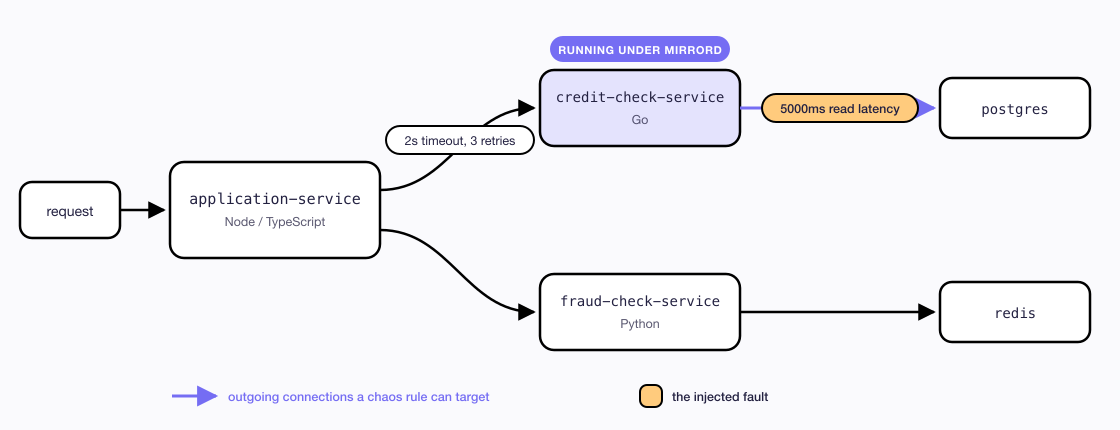
Moving the chaos rule one hop deeper, onto credit-check-service's own Postgres query
Stop the application-service session and run credit-check-service instead:
cd ../credit-check-service
mirrord exec -f mirrord.json -- go run main.go
That is a new session with a new ID, so pick it up before adding anything, then slow down the service’s own Postgres query:
mirrord session list
export SESSION_ID='<the new session id>'
mirrord chaos add -s $SESSION_ID -f ../chaos-rules/04-postgres-latency-bonus.json
Now send a loan application through the cluster with your session header on it. It fails, after 6.7s:
{"error":"credit-check-service unreachable after 3 attempts: The operation was aborted due to timeout"}
The deployed application-service forwarded the baggage header, the filter on credit-check-service matched it and steered the request to your copy, and your copy hit the injected latency. Five seconds per read is well past the two second per-attempt timeout in getCreditScore, so all three attempts time out. Retries only help when some attempts succeed, and here none do.
Send the same request without the header and it is approved in around 10ms.
So a fault can go in at any hop, and the blast radius stays at the process you attached it to.
The second part follows from configuration rather than from anything fixed about the system. credit-check-service runs the same filtered steal that application-service uses, so the session header is the only thing separating your copy from the deployed pod: a request carrying it meets the injected latency, and a request without it is served inside the cluster from end to end. Carrying a session further down a chain than this needs every service on the path to forward the header, which is a property of your app rather than of mirrord.
Trying It
The app is at metalbear-co/loan-demo-app, with all the rule files used here in chaos-rules/. Any Kubernetes cluster works, including a local kind cluster.
The chaos testing docs cover the full rule schema, the UI, and the REST API for wiring rules into a pipeline.
What is mirrord?
mirrord is a Kubernetes development platform that lets developers and AI coding agents test code in a production-like environment before deploying it. Your service runs wherever you're working, locally, in CI, or in an agent's sandbox, while mirrord proxies its traffic, environment variables, and files to and from a shared staging cluster, so it behaves as if it were deployed without actually being deployed.
Engineering teams at companies like monday.com, National Australia Bank, and SurveyMonkey use mirrord to iterate and ship faster, while spending less on dev environment infrastructure.