How to Work with Server-Side Rendered Frontends Locally
Server-side rendered (SSR) web applications work by rendering the entire page on the server and sending it to the browser in response to a request. This differs from the client-side approach, where the page loads partially and then runs JavaScript to fetch the rest. Frameworks like Next.js and Nuxt.js make SSR straightforward. But when it comes to developing SSR frontends locally, the experience is often not ideal.
In this blog, we’ll look at the common approaches developers use today, why they fall short, and how mirrord can significantly improve the development experience for SSR applications.
The Problem With Developing SSR Frontends Locally
When your frontend is rendered on the server itself, you don’t expose other microservices that the frontend talks to externally. Instead, all the communication happens internally in the Kubernetes cluster where you’ve deployed your application. So when you’re developing that frontend locally, you typically have to run all dependent services locally. This creates a poor developer experience since you end up having to configure the microservices that your frontend needs locally and run them each time you want to develop.
The second issue is that even after doing that, your local setup will differ significantly from what the production setup looks like, and won’t allow you to realistically test how the code you’ve written will behave when pushed to production. For that, you end up relying on CI and staging deployments, which often take 15–20 minutes since they involve building container images.
Not having a way to test code in a realistic environment instantly slows down developers. It also introduces bugs that arise because of a disparity between the local development environment and production. But what if there was a way to run your SSR frontend code in the context of your cluster instantly as you write it, without going through CI or building any container images?
mirrord Improves the Development Experience for SSR Applications
mirrord is a tool that lets you run your local code as if it were running inside a Kubernetes cluster, without building or deploying container images. Your code still runs locally, but mirrord proxies incoming and outgoing traffic, environment variables, and files back and forth between your local running process and its counterpart in the cluster.
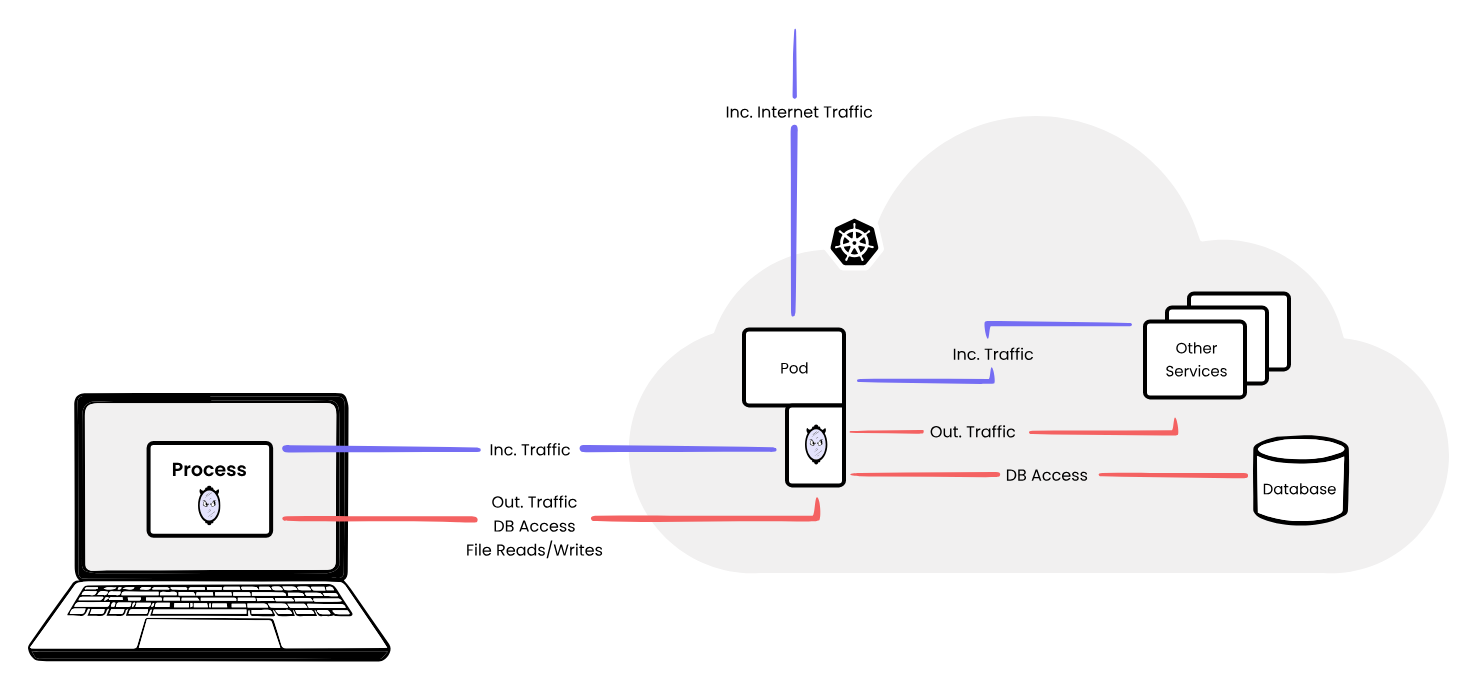
How mirrord works
This means that when your locally running frontend code makes a request to a service in the cluster, mirrord proxies that request and makes it appear as if it’s coming from within the cluster. This allows it to communicate with the other services, get a response back, and then mirrord mirrors that response back to the locally running process as well. This way, you’re able to test your code in the context of your cluster while avoiding the hassles of setting up dependencies locally or creating port-forward sessions. You connect to an existing cluster where all services are already deployed, which is usually the staging or pre-production environment in most organizations.
Let’s look at some examples to understand this better. Suppose you’re working on the frontend for a shopping cart application, and on the checkout page you need to send requests to three other services to get information from them. The code for that would look something like this:
// app/checkout/page.tsx — Server Component
export default async function CheckoutPage() {
  // These three services only exist inside the K8s cluster
  const cart = await fetch("http://cart-service:3001/api/cart");
  const prices = await fetch("http://pricing-service:3002/api/calculate");
  const inventory = await fetch("http://inventory-service:3003/api/check");

  return <CheckoutForm cart={cart} prices={prices} inventory={inventory} />;
}
Without mirrord, your locally running SSR code will not be able to resolve the addresses of other services like cart-service:3001. But when you run it with mirrord, it will forward those requests to the corresponding services running in the Kubernetes cluster, allowing your locally running process to receive a response back from them. This is what lets you see how your code changes will behave when pushed to the cluster.
Environment Variables and Third-Party APIs
But it’s not just traffic that mirrord mirrors. It also proxies environment variables and files between the cluster and your local machine. This is useful for things like accessing third-party APIs without managing separate credentials per developer.
Take payment processing as an example. Your checkout route needs to call Stripe to create a payment intent, and to do that it needs a secret key. That key is already set in your staging cluster and you don’t want per-developer copies of it. When you run your local code with mirrord, it mirrors the pod’s environment variables to your local process. process.env.STRIPE_SECRET_KEY resolves without any manual setup, and your code gets a real response from Stripe to verify the checkout flow works correctly.
// app/api/checkout/route.ts
export async function POST(req: Request) {
const { cartId } = await req.json();
const cart = await fetch(`http://cart-service:3001/api/cart/${cartId}`).then(
(r) => r.json(),
);
const paymentIntent = await fetch(
"https://api.stripe.com/v1/payment_intents",
{
method: "POST",
headers: {
Authorization: `Bearer ${process.env.STRIPE_SECRET_KEY}`,
"Content-Type": "application/x-www-form-urlencoded",
},
body: `amount=${cart.total}¤cy=usd`,
},
);
return Response.json(await paymentIntent.json());
}
This keeps credentials centralized in the cluster and eliminates the overhead of managing separate keys for each dev environment. It also reduces the attack surface since your platform team maintains one set of credentials rather than issuing and tracking per-developer tokens.
Trying It Out
So to sum up, using mirrord for the development of server-side rendered frontend applications brings several benefits:
- It allows developers to run local code in the context of an existing Kubernetes cluster where things are already deployed instead of running everything locally or port-forwarding.
- It provides a realistic environment to test code changes in without going through time-consuming CI pipelines and staging deployments.
- It is a more secure approach, allowing platform and DevOps teams to maintain only one set of credentials for third-party APIs instead of per developer.
mirrord can be used to run your frontend services via the CLI using the mirrord exec command:
mirrord exec --target deployment/your-frontend-deployment -- <your-start-command>

# for example
mirrord exec --target deployment/checkout -- npm start
Or it can be used as a code editor extension available for multiple code editors, including VS Code, Cursor, and the JetBrains IDEs.
If you want to try out mirrord, you can head over to our documentation to learn how to get started.