How We Made mirrord Run Natively on Windows
For a long time, mirrord on Windows meant one thing: running it inside the Windows Subsystem for Linux. mirrord was built on Unix and already ran on Linux, so WSL was the quickest way to give Windows users a working setup without first solving native support. It worked, and it was our Windows story for a while.
Relying on WSL as a prerequisite has real drawbacks, though. It adds a second environment to install and keep in sync, since your tooling and configuration often have to exist both on the Windows host and inside the Linux distribution, it can be unstable, and many tools only integrate with it when they’ve been explicitly built to, with those integrations rarely at full parity with running natively. For a tool that prides itself on how easy it is to use, requiring that extra layer was never where we wanted to settle.
So we set out to make mirrord run natively on Windows. Most of the difficulty comes from a single difference between the platforms, so that’s where it’s worth starting.
New to mirrord? It runs your local process inside a live Kubernetes cluster. It works the same way for developers and for AI coding agents (Claude Code, Cursor, Codex, Copilot, Windsurf): your code runs on your machine, but mirrord routes its traffic, files, and environment variables through a target pod in the cluster.
How the mirrord-layer loads on Unix
mirrord works by loading a component called the mirrord-layer into your process before any of your own code runs. It intercepts the calls your program makes, for networking, files, and environment variables, and reroutes them to your Kubernetes cluster, so the local process behaves as though it were running in the cluster.
On Unix, loading the mirrord-layer is straightforward because we control the environment a process starts in. Linux provides LD_PRELOAD, and macOS provides DYLD_INSERT_LIBRARIES: when that variable is set, the dynamic loader maps our shared library into the process and runs its constructor before main without our users having to change a single line of code. Controlling that environment is the whole trick: set one variable, the mirrord-layer loads before the program runs its first instruction, and that’s the entire mechanism.
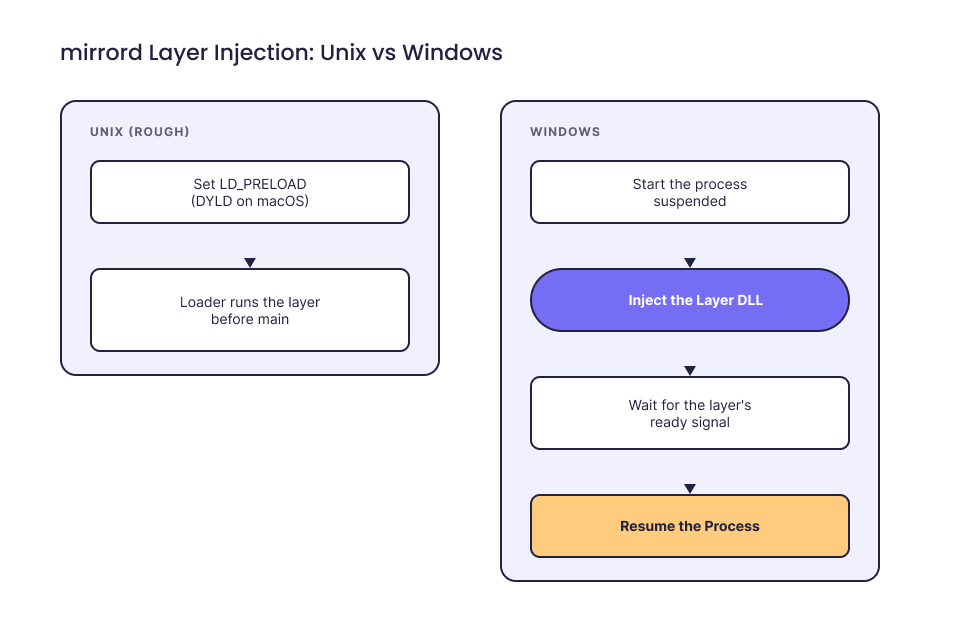
mirrord-layer injection: Unix vs Windows
Everything the mirrord-layer does afterward depends on getting in that cleanly. Windows has no LD_PRELOAD and no equivalent single mechanism, so on Windows we had to implement that first step ourselves, and then reimplement it for each way Windows creates and manages processes differently from Unix.
Loading the mirrord-layer on Windows
When we launch the target process ourselves, we inject the mirrord-layer by hand. We start the process suspended so its main thread is frozen before it runs any instructions, inject the mirrord-layer DLL on a separate thread inside the frozen process, and wait for it to signal, through a Windows named event, that it’s finished installing its hooks. Only then do we resume the main thread. The result is the same as what LD_PRELOAD provides on Linux, reached through several manual steps instead of one.
Some processes we don’t launch ourselves. A debugger, for example, creates the process before handing it over, so there’s no command line to wrap. For those, we inject the mirrord-layer into the process after it’s already running.
Child processes required more work. On Linux, a forked child inherits a copy of the parent’s memory, including the mirrord-layer, so it’s covered automatically. Windows creates processes differently, so each child a target spawns has to be injected on its own. Rather than intercepting every process-creation API separately, we hook CreateProcessInternalW, the internal function they all call through, which lets a single hook cover CreateProcessW, CreateProcessAsUserW, and the others.
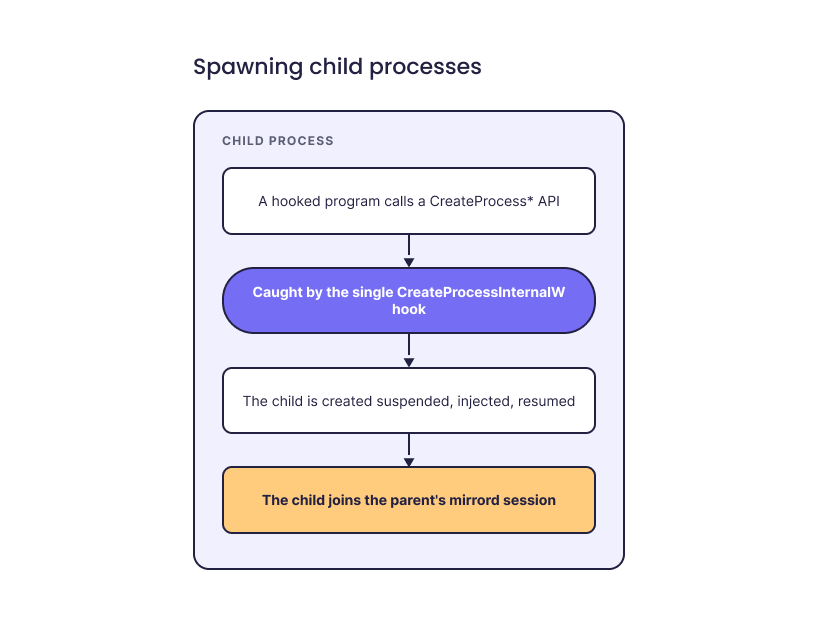
Injecting the mirrord-layer into spawned child processes
Getting the IDE plugins to work
Plenty of people use mirrord from the command line, but for a lot of developers, the natural way to reach for it is inside their IDE, running or debugging as they normally would. Native Windows support had to reach the IDE plugins too, and that was the harder part, the one that shows most directly what the missing LD_PRELOAD costs. The plugins drive mirrord through two internal entrypoints, pitm (Process In The Middle) and attach, neither of which you invoke yourself. The CLI uses a third, exec.
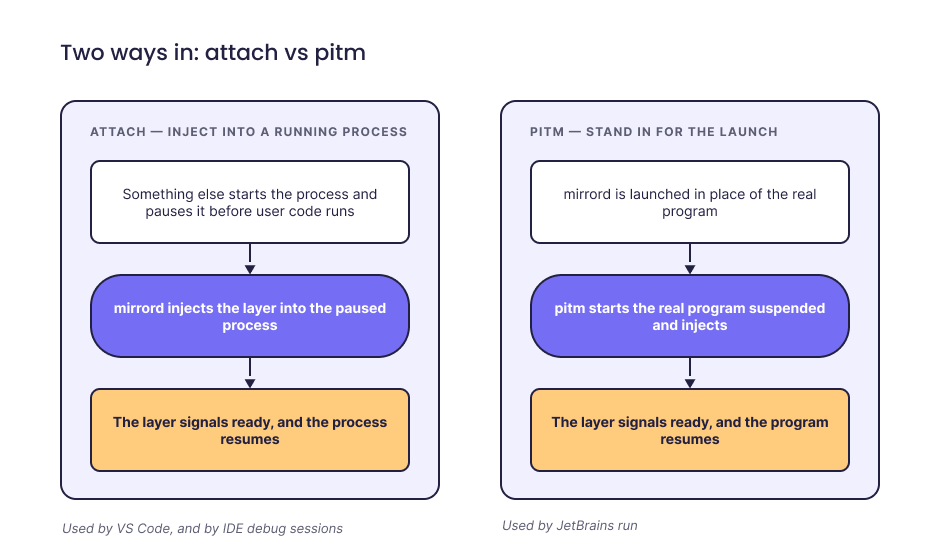
Getting the layer in: attach vs pitm
VS Code
VS Code is the simpler case. It can pause a process before user code runs and give us its process ID, which is close enough to the clean injection path that the extension has run natively on Windows since version 3.69.0.
JetBrains
JetBrains is more involved. It builds its own run command and doesn’t expose a hook point early enough for us to inject cleanly, and it ultimately launches your code through the Java runtime, java.exe, which we don’t control. Our approach is to replace the JDK the run configuration points at, so that <home>/bin/java.exe is actually mirrord. Launched as java.exe, pitm starts the real java.exe suspended and injects the mirrord-layer before your program runs.
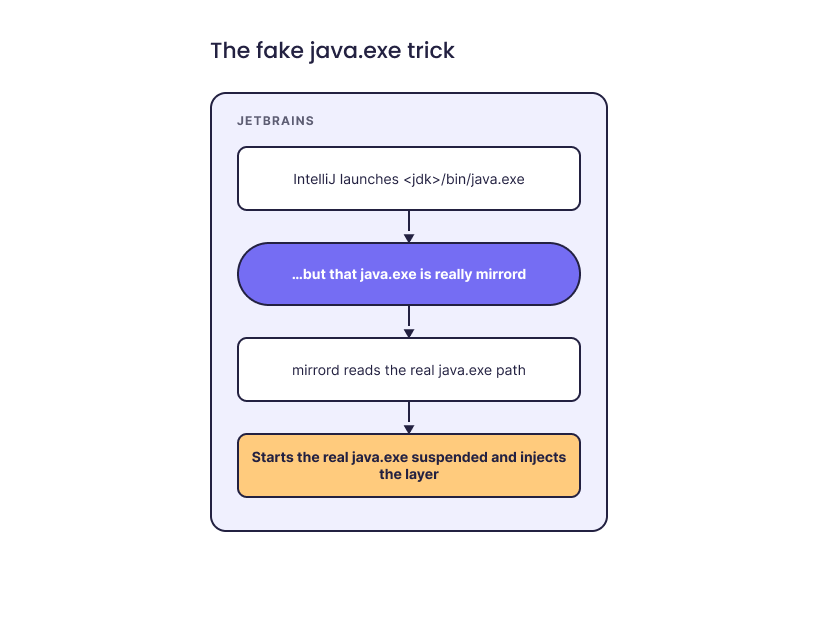
The fake java.exe trick
That covers a plain run.
The other launch types
Each of the other launch types needed its own handling.
For a Gradle run, IntelliJ doesn’t call java directly; it drives Gradle, which generates the task that runs your main(). We inject a Gradle init script that wraps the real execution in mirrord pitm, and we pass the command through an argfile because a full classpath can exceed Windows’ 32 KiB command-line limit.
Even deciding whether to engage on a Gradle launch turned into a real detour: IntelliJ generates the run task at runtime rather than running a named one, so we had to reverse-engineer how it does that. Fixing it also cleared up a case where those launches had been silently skipping mirrord on Linux and macOS.
For debugging, there’s no command line to wrap because the debugger owns the process. We let it start, identify the process by matching the JDWP debug port against netstat -ano, hold the program at its suspension point long enough to run mirrord attach <pid>, and then let it resume.
For Rider and .NET, the shape is the same with different APIs: pause the debug session once the target is ready, attach to its process, and resume on the correct thread.
These IDE integrations are, by necessity, very specific to each IDE’s internals; one reviewer on the JetBrains change described it as “a mind-bending task.” A smaller instance of the same pattern: the IntelliJ build-system debug path can require a Windows firewall exception, which triggers an admin prompt for something that needs none on Linux.
Full launch matrix (per-scenario reference)
The diagrams above show the shape of each case; the table below is the exact code path for each scenario, for anyone who wants the detail.
| Scenario | Strategy |
|---|---|
| IDEA non-Gradle (Run & Debug) | Fake JDK: the run config’s JDK is swapped so <home>/bin/java.exe is actually mirrord.exe, which starts the real java.exe suspended and injects the mirrord-layer. |
| IDEA Gradle Run | Injected Gradle init script. Replaces the JavaExec.StandardTaskAction on the user’s target task with execOps.exec { mirrord.exe pitm -- <real java> @argfile }. Uses ExecOperations for Stop-in-IDE cancellation and @argfile for Windows’ 32 KiB command-line limit. |
| IDEA Gradle Debug | JDWP hook. On DebugProcessImpl.processAttached, hold the VM suspended so user code doesn’t run yet, resolve the PID via netstat -ano matched on the JDWP port, run mirrord attach <pid> (blocks until the mirrord-layer signals init), then resume. |
| Rider Run | PatchCommandLineExtension.patchRunCommandLine and MirrordPitm.wrapCommandLine rewrite the command line into mirrord.exe pitm -- <exe> <args>, ferrying the mirrord env through a single base64-encoded MIRRORD_CHILD_ENV so the wrapper doesn’t inherit them. |
| Rider Debug | DotNetDebuggerSessionModel.targetReady → session.pause() → on sessionPaused, run mirrord attach <sessionInfo.processId> on a pool thread → dispatch session.resume() on the EDT (required because XDebugSession fires EDT-asserting listeners like LinqInlayDisplay.beforeSessionResume). |
Using mirrord on Windows
None of this is visible when you use mirrord. You write ordinary code, point it at your cluster, and behavior that would normally require running inside the cluster works from your Windows machine. You can read a file at a Linux-style path from whatever language you’re using, and it resolves through the cluster, even though the path doesn’t look like a Windows path.
Now, with mirrord on Windows, you launch your service the same way you would on Linux or macOS:
mirrord exec -t deployment/my-service -- dotnet run
Say it reads a config file that only exists inside the cluster, at a Unix path that means nothing on Windows:
# runs on your Windows machine, with mirrord
with open("/etc/app/config.yaml") as f:
    config = f.read()
On a plain Windows machine that read fails: there’s no drive letter, and the file isn’t there. Run it with mirrord and the same read is served from the target pod’s filesystem, returning the real config your service sees in the cluster. You didn’t change the code, mount anything, or rewrite the path; the mirrord-layer intercepted the read and answered it from inside the cluster.
What ships today
The CLI runs natively on Windows (x86_64), with no WSL required. The VS Code extension has run natively since 3.69.0. The JetBrains plugin runs natively as of mirrord-intellij 3.73.0 for Rider and for IntelliJ IDEA including Gradle, across run and debug, with a few less-common run configurations still falling back to WSL. ARM64 Windows isn’t supported yet, unlike macOS, because x86_64 came first.
Try it
If you’re on Windows x86_64, install the mirrord CLI and start working against your cluster without WSL and without special Windows accommodations to your codebase. The installation guide has the steps, and the VS Code and JetBrains plugins bring the same native support into your editor. For the setups that still need it, the WSL guide is still available.
We’d like to hear how it works on your setup, particularly the rough edges. We’re around in our community Slack.
What is mirrord?
mirrord is a Kubernetes development platform that lets developers and AI coding agents test code in a production-like environment before deploying it. Your service runs wherever you're working, locally, in CI, or in an agent's sandbox, while mirrord proxies its traffic, environment variables, and files to and from a shared staging cluster, so it behaves as if it were deployed without actually being deployed.
Engineering teams at companies like monday.com, National Australia Bank, and SurveyMonkey use mirrord to iterate and ship faster, while spending less on dev environment infrastructure.