Introducing mirrord Preview Environments
We’ve launched mirrord Preview Environments, which let you run your work-in-progress service as an isolated pod inside your staging Kubernetes cluster, and share them with stakeholders like product managers, QA, and other developers. This lets you get early feedback on your changes without actually deploying to a shared environment.
In this blog, we’ll cover what preview environments are, how they help you move faster, and how you can get started using them.
Why teams need Preview Environments
Shipping software is an iterative process that relies heavily on feedback. Developers can run and test their code when building something, but they aren’t the only stakeholders. Often, feedback is required from other team members like:
- Product managers wanting to validate the changes
- QA engineers needing to test different scenarios and edge cases
- Sales teams intending to demo the changes to a prospect
But developers have no easy way of sharing these changes and getting feedback from these stakeholders without pushing the code to a staging environment (or sometimes even production!). The problem with this is that deploying to staging is a slow process in most organizations. It usually involves going through CI pipelines, waiting for approvals, and coordinating with other teams using the same environment. Getting feedback after deployment means going through this same time-consuming process again for every iteration.
A big reason for this friction is how staging environments are structured. Staging typically runs a single “current” version of the application that represents what is about to ship. Updating that version means replacing what’s already running, which immediately impacts anyone else using the environment. As a result, teams are cautious about how often they deploy and who gets access. Even when teams try to work around this by using separate namespaces in staging, they end up replicating the entire application stack in each namespace, which increases cloud costs and operational overhead.
Preview environments help solve these problems.
What are mirrord Preview Environments
mirrord’s core functionality already solves the issue of multiple developers sharing a single Kubernetes environment (usually the staging cluster) for development. With regular mirrord sessions, developers run their code locally while mirrord connects it to the shared cluster and safely mirrors traffic, environment variables, and files between the local process and the target service running in the cluster. Features like HTTP traffic filtering ensure that each developer’s changes run isolated so that everyone can continue to use the same shared staging environment. This makes it possible to test against real dependencies without breaking the environment for others.
Preview environments build on this foundation but move code execution fully into the cluster:
- You build and deploy only the service you’ve changed as an isolated pod inside the shared Kubernetes cluster.
- The new revision runs alongside the existing stable version, without replacing it or affecting other users.
- Traffic is filtered and routed to the preview (for example, via a header filter), so only the intended stakeholders using the filter see the new behavior.
- You can safely share that filter with product, QA, or sales and let them see the change in a real, production-like environment.
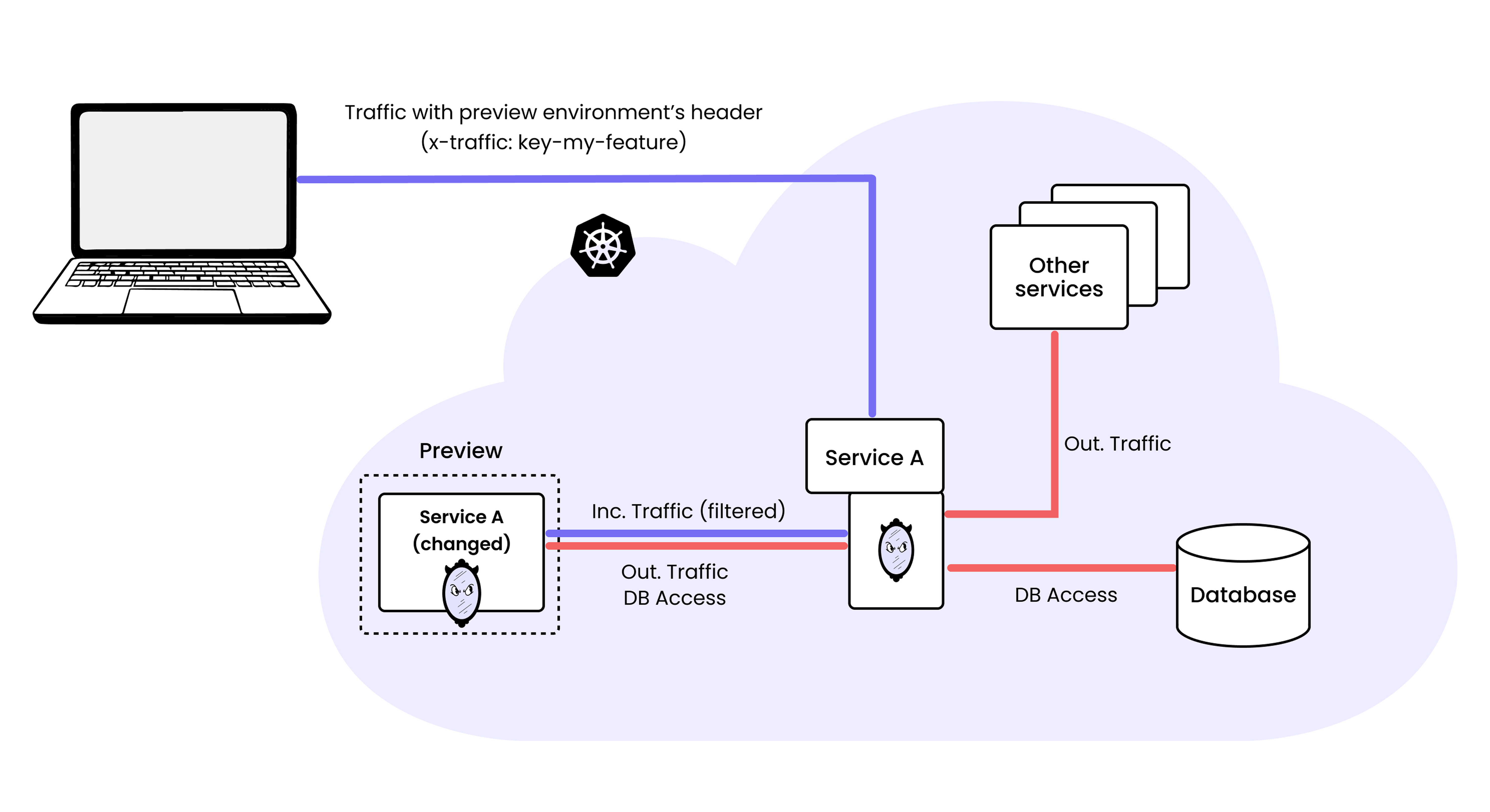
How mirrord Preview Environments work
Because the preview runs inside the cluster, it can communicate directly with the existing services already deployed there. If you’ve only changed one microservice, you don’t need to redeploy the entire application. Your preview service talks to the existing databases, queues, and other microservices just like it would in staging or production. This avoids duplicating infrastructure and keeps cloud costs lower, since you’re not spinning up full environment copies for every branch.
Multiple preview environments can also run at the same time, each isolated from the others. The result is a production-like sandbox for every change, enabling faster feedback.
How to use mirrord Preview Environments
Using mirrord Preview Environments is straightforward once you have the prerequisites in place:
- The mirrord Operator is installed in your cluster with an Enterprise license.
- The
operator.previewEnvfeature flag is set totruein your Helm chart’svalues.yaml. - The container image for the service you want to preview is built and pushed to a registry accessible by the cluster.
Once these are set up, you can configure preview environments using the standard mirrord configuration file, with preview-specific settings under feature.preview. Here’s an example:
{
  "key": "key-my-feature",
  "target": {
    "path": "deployment/my-app",
    "namespace": "staging"
  },
  "feature": {
    "preview": {
      "image": "my-registry/my-app:feature-branch",
      "ttl_mins": 60
    },
    "network": {
      "incoming": {
        "mode": "steal",
        "http_filter": {
          "header_filter": "x-traffic: {{ key }}"
        }
      }
    }
  }
}
In this configuration:
targetspecifies which existing workload to clone the pod spec from.preview.imageis the new version of your service that you want to test.ttl_minsdefines how long the preview environment should stay alive.- The
keyuniquely identifies this preview environment. - The
http_filterensures that only traffic containingx-traffic: key-my-featureis routed to the preview pod.
You can then launch your preview environment by running:
mirrord preview start -f mirrord.json
When you do this, the mirrord operator clones the pod spec of the target deployment and creates a new isolated pod using your preview image. That pod runs inside the cluster with access to internal networking, DNS, and other services.
Once your preview environment is live, you can share the key with teammates so they can send requests to the preview. The mirrord Browser Extension can help set the key as the header filter. This way, you can gather feedback by letting stakeholders preview your changes, iterate as needed, and repeat the process. Once everyone is satisfied, you can proceed with a final push to staging as you normally would.
Preview Environments help teams ship faster
Preview Environments change where feedback happens in your development cycle. Instead of merging first and getting feedback later, you can deploy a new revision of your service into your existing cluster and test it against real dependencies and traffic. All of this happens without replacing the stable version in staging, affecting other teams, or increasing your cloud spend.
This means feedback can happen earlier and more frequently. Product managers can validate functionality before it reaches staging. QA can test edge cases against real services. Sales engineers can demo upcoming features sooner and gather customer feedback earlier in the process.
This model becomes even more powerful with AI agents. As AI coding agents begin shipping features and fixes autonomously, the need for a safe validation method becomes critical. Instead of reviewing Git diffs alone, you can let an AI agent deploy its changes into a preview environment automatically. You then get a realistic, production-like environment where you can see the code running, test end-to-end workflows, and validate behavior before anything is merged.
mirrord Preview Environments make it possible to ship faster without increasing risk. Whether changes are written by developers or generated by AI, every revision can have its own isolated space to run and be reviewed before it reaches staging or production. You can learn more about preview environments in our docs here.