Stop Deploying to ECS Just to See If Your Code Works
On ECS, the usual way to find out whether a change works is to deploy it. You build the image, push it, register a new task definition revision, wait for the rollout and look at what happened, then do it all again if it’s wrong. A loop like that might have been tenable for humans, but a coding agent writes a change in seconds, then waits for a full rollout to learn whether it worked, and it rarely gets there on the first try. Most of the speed you got from the agent ends up spent on waiting for rollouts.
Today we’re launching mirrord for ECS. Your code can now run on your laptop, in your CI runner or in your coding agent’s sandbox as if it were a live task in your staging environment, with the task’s network, environment variables and IAM task role. It reaches the same databases, queues, and internal and external APIs as the deployed service. Only the requests that carry your session header come to it, so you, your teammates and your agents can each run your own version of the service at the same time, on the staging environment you already share. You find out whether a change works by simply running it, without deploying anything or spinning up an environment of your own.
Why this didn’t exist on ECS
Nothing else does this on ECS, and there’s a reason for that. Every tool in this category, Telepresence, Signadot and mirrord included, was built on Kubernetes, and leans on it for two main things:
- Kubernetes lets a tool put its own component next to your service
- The Kubernetes API gives a developer’s laptop a way to reach that component, controlled by RBAC
ECS has none of it. You can’t add a container to a running task, and there’s no hook that adds one when a task starts. AWS gives you ways to open a shell or forward a port into a task, but nothing that sends the task’s traffic out to your machine, and no shared API that a laptop and a task can both reach and authenticate against. To make mirrord work on ECS, we had to build our own way into the task, and our own way to connect your machine to it and authenticate both sides.
What we built
You add a small setup container to each service’s task definition and deploy it once. It stays in place from then on, so you don’t redeploy to test changes, only to update mirrord itself. When the task starts, the setup container loads mirrord into your app container, where it runs with the app’s network and environment. Your image stays the same.
To connect the two sides, your machine and the task each make an outbound HTTPS connection to a component we call the sessions-manager, which pairs them and relays traffic between them. Neither your machine nor the task has to accept an inbound connection for this, so you don’t open any new ports.
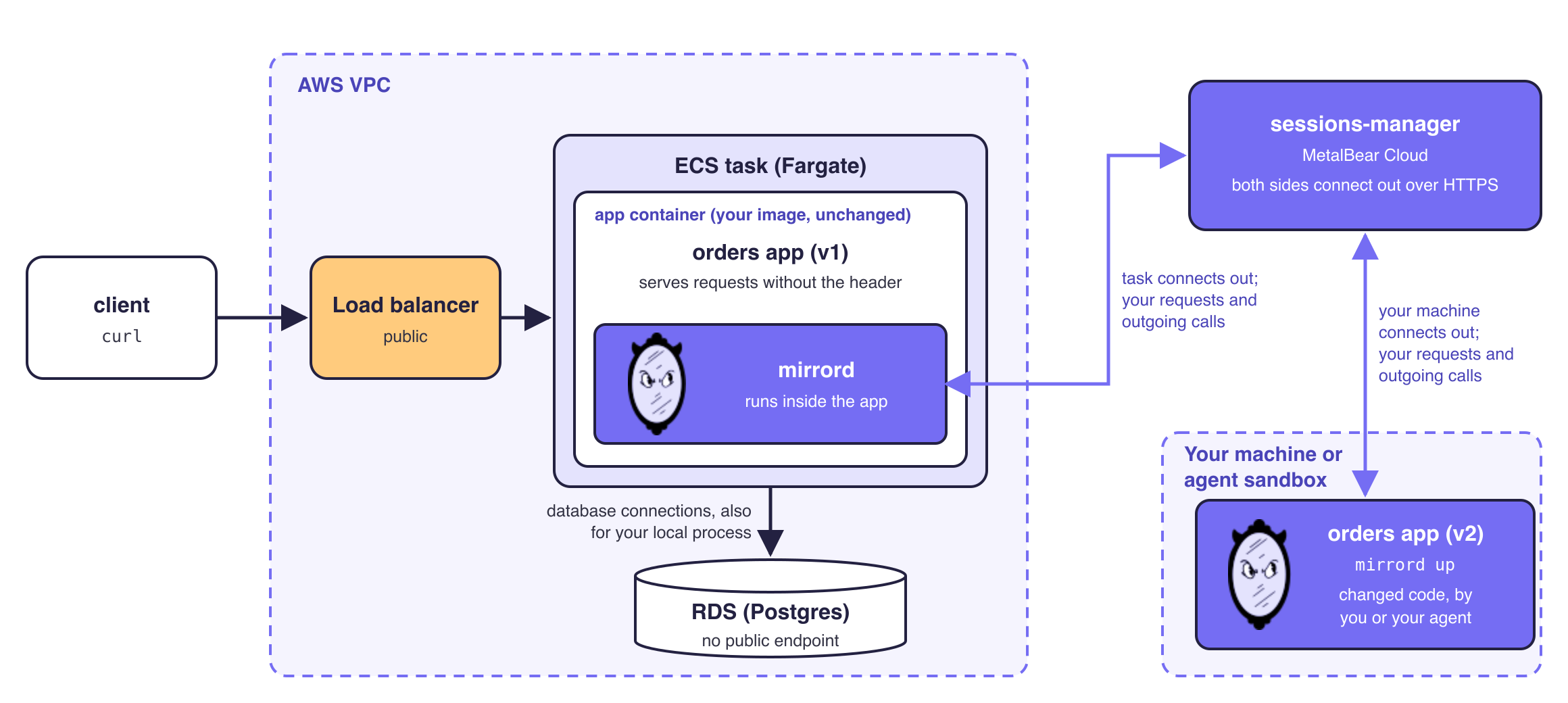
mirrord for ECS with the sessions-manager in MetalBear Cloud. mirrord runs inside your app container, and both the task and your machine connect out to the sessions-manager, so your local code reaches the private database through the task.
You choose where the sessions-manager runs: in a Kubernetes cluster of your own, or hosted in MetalBear Cloud. Either way, session traffic passes through it over HTTPS, and both your tasks and your developers have to authenticate to it. The security details are in the docs.
What it looks like after setup
From there, you or your agent start the service locally with mirrord up, then send requests with your session header to the service’s usual staging address:
mirrord login
mirrord up --key $USER

# from another terminal, or from your agent
curl -H "baggage: mirrord-session=$USER" https://orders.staging.example.com/orders
You pick the session key with --key. Requests to staging that carry it go to your machine, and everyone else’s requests still go to the deployed task. Your code’s outgoing calls leave from inside the task, so they reach the private databases and internal APIs that only the task can reach, and your local process runs with the task’s environment and IAM task role. When something’s wrong, you just change the code and run it again, with nothing to build or roll out in between.
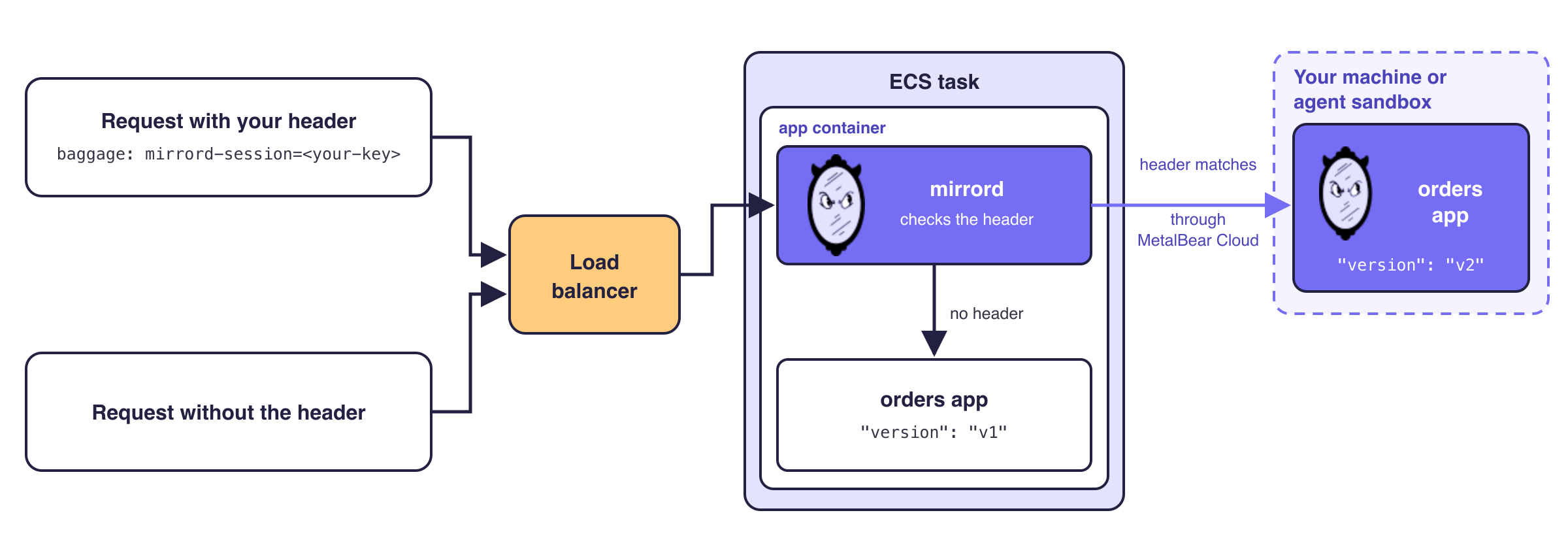
mirrord checks each request’s session header. Requests with your key go to the code on your machine or in your agent’s sandbox; every other request is served by the deployed task as usual.
Try it
Start at metalbear.com/mirrord/ecs. The ECS sample app uses Terraform to deploy a small service next to a private RDS database, then walks you through running that service locally against the database.
If you’re on another platform, Lambda, Cloud Run, Vercel and Cloudflare are on the waitlist, and you can tell us there which one you need.
What is mirrord?
mirrord is a Kubernetes development platform that lets developers and AI coding agents test code in a production-like environment before deploying it. Your service runs wherever you're working, locally, in CI, or in an agent's sandbox, while mirrord proxies its traffic, environment variables, and files to and from a shared staging cluster, so it behaves as if it were deployed without actually being deployed.
Engineering teams at companies like monday.com, National Australia Bank, and SurveyMonkey use mirrord to iterate and ship faster, while spending less on dev environment infrastructure.